Google Search Console Social Media Tracking: What It Really Shows
WeAreQED
Posted:
Updated: July 14, 2026
TL;DR: Google Search Console social media tracking arrived on 7 July 2026 as a new property type called platform properties, covering Instagram, TikTok, X and YouTube. It shows how your social posts perform in Google Search and Discover, and nothing else.
Connecting an account takes about ninety seconds. Google’s own documentation is explicit that platform properties do not measure how your content performed inside Instagram or TikTok, which is the misreading most of the coverage has invited. For a UK small business with a modest following, the click totals will look bleak.
The one report worth opening is Queries. We connected the QED Web Design Instagram account on the day of launch and walk through what appeared, what did not, and who this feature actually serves.
Google Search Console social media tracking went live on 7 July 2026, and for the first time, you can verify something in Search Console that you do not own. QED Web Design is a sustainable WordPress web design studio, and we have spent fifteen years telling small business owners that their website is the only digital asset they properly control.
That advice has not changed. What has changed is that Google will now tell you how the assets you do not control are performing inside its own results.
We connected the QED Instagram account on the morning of launch, which is where the screenshots in this post come from. The setup was straightforward. The reports were empty, as Google said they would be. The interesting part is not the mechanics, it is the gap between what the feature measures and what a lot of people appear to think it measures.
If you are trying to work out whether to spend an afternoon on this, or whether it changes anything about how you approach SEO for a small business, the honest answer sits somewhere in the middle. Here is what we found.
Key Takeaways
Platform properties are a new Search Console property type, announced on 7 July 2026, that report on how your Instagram, TikTok, X and YouTube content performs on Google Search, Discover and Google News.
Exactly four platforms are supported at launch. LinkedIn, Facebook, Pinterest and Threads are not among them.
Google’s help documentation states plainly that platform properties do not track when people see your content on the platform itself, so they are not a replacement for Instagram Insights or TikTok Analytics.
You verify by authorising the account, not by proving control of a domain, which means Search Console now accepts ownership of assets on domains you have no developer access to.
Google’s confirmation dialog states data can take up to 48 hours to appear, while the empty Performance report says to check back in a day or so, and the help documentation says a few days. Three timings, one feature.
What is Google Search Console social media tracking?
Google Search Console social media tracking is delivered through platform properties, a property type that lets you connect an Instagram, TikTok, X or YouTube account and see how that account’s content performs in Google Search. Moshe Samet, Product Manager Lead for Search Console, announced it on the Google Search Central blog on 7 July 2026.
Search Console has always understood two kinds of property. A domain property covers everything on a domain and is verified through DNS. A URL prefix property covers one path and is verified by uploading a file or adding a tag. Both require you to control the website.
A platform property breaks that pattern. You are not proving you control instagram.com. You are proving you control an account that lives on it, by authorising Google through the platform’s own login. That is a genuine departure, and it is the part of this launch that deserves the attention it is getting.
Three reports come with it, according to Google’s help documentation (Google Search Console Help, 2026). Performance gives you clicks, impressions, average click-through rate and average position, filterable by post and by query. Insights gives a summary of traffic trends and top content. Achievements tracks click-based milestones as your audience grows.
Discover and Google News reports only appear if your content actually receives traffic from those surfaces. For most UK small business accounts, they will not appear at all. Whether the numbers underneath these reports mean anything for a business your size is the subject of the section on who this actually helps.
What does a platform property not show you?
A platform property does not show how your content performed on the social platform itself. Google’s help documentation states directly that platform properties only show how your content performs on Google Search, and that they will not tell you how many times your video appeared on TikTok.
Read that twice, because a fair amount of the launch coverage has been loose about it. A phrase circulating on LinkedIn since Tuesday has been that this is the biggest social SEO update of the year, which frames the feature as a way to measure social performance. It is not. It measures the small slice of your social content that surfaces in Google’s results.
Common mistake: Treating platform property data as a substitute for native analytics. If a Reel gets 40,000 views inside Instagram and zero impressions in Google Search, your platform property will report zero. That is the feature working correctly, not a bug.
There is a second limit worth understanding. Impressions are counted when your content appears in a Google search result or in Discover. Instagram stories that surface in Google Search count as impressions, and a click on one counts as a click. For videos, Google counts a click even when the video opens inside Google’s own viewer rather than sending the user to your profile.
That last detail matters more than it looks. A click in this report does not reliably mean a person arrived on your Instagram profile. It can mean they watched your video without ever leaving Google. Anyone who has watched Google absorb click traffic through AI Overviews and featured snippets will recognise the shape of that.
How do you connect Instagram to Google Search Console?
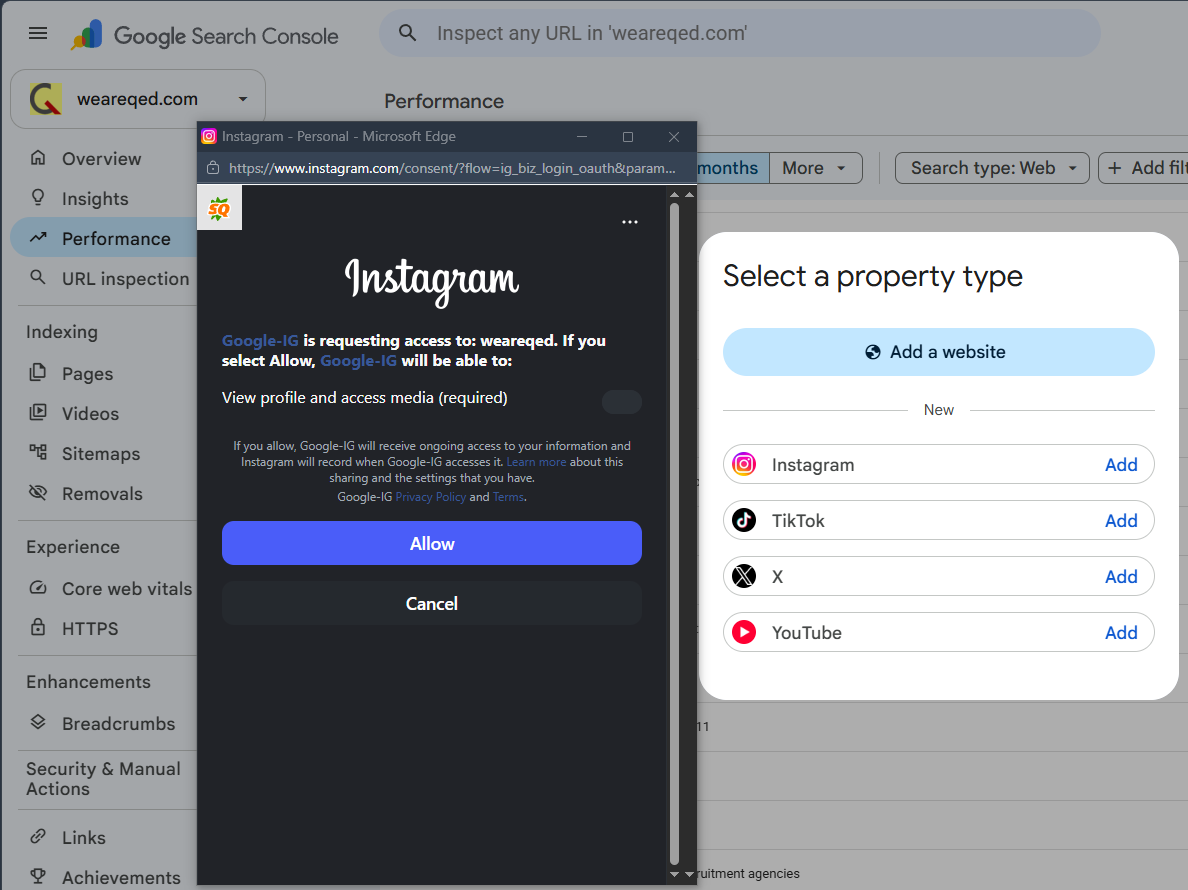
You connect Instagram to Google Search Console by opening the property selector, clicking Add property, and choosing Instagram from the list of supported platforms. Google then opens the platform’s own authorisation window, where you grant it permission to view your profile and media.
The full sequence, based on our own setup on 7 July 2026:
Open Search Console and click the property selector dropdown in the top left, then Add property.
Under the heading marked New, you will see Instagram, TikTok, X and YouTube, each with an Add link. If they are not there, the rollout has not reached your account.
Click Add next to your platform. A window opens on the platform’s own domain, requesting access to view your profile and media.
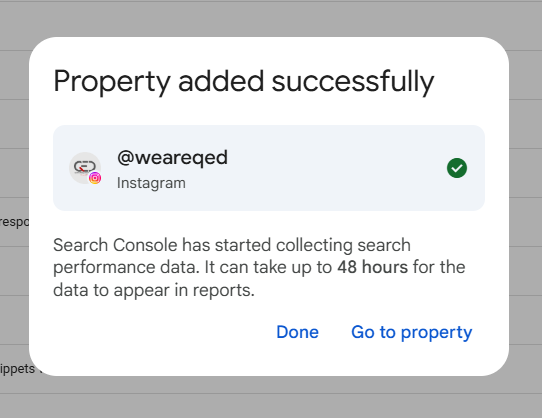
Click Allow. Search Console confirms the property has been added.
Repeat for every account. One property per account, per platform.
Pro tip: Log into the correct account in that browser before you start. The authorisation window picks up whichever profile is already signed in. Our consent screen opened against a personal login, and it would have been very easy to click Allow without reading the account name at the top.
Ownership is checked periodically. Google’s documentation notes that if an external login expires, access to the property pauses until you re-verify, and that re-verifying restores the same report without waiting for data to rebuild. Anyone who has managed ongoing website maintenance for a client will know how these quiet re-authentication requirements have a habit of failing silently six months later.
The checklist below tracks the setup and the judgement calls that come after it.
Platform property setup tracker
Six steps to connect a social account to Google Search Console and get usable data out of it. Tick as you go.
Open the property selector, click Add property. If Instagram, TikTok, X and YouTube are not listed under "New", the rollout has not reached you yet. Nothing is broken.
The OAuth window authorises whichever account is already signed in on that browser. Log into your business profile before you start, not your personal one.
The platform will ask you to grant Google access to view your profile and media. Accept, and Search Console confirms the property has been added.
One property per account, per platform. Two Instagram profiles means two properties. Data does not merge across them.
Google's confirmation dialog says up to 48 hours. The empty Performance report says "check again in a day or so". The help documentation says a few days. Expect the longest of the three.
The click count will be small. The query list is the value: it shows what people typed into Google before landing on your post. Feed those terms back into your website content.
0 of 6 complete
Not started
Work through the steps above. Remember that a platform property measures Google Search only. It tells you nothing about how your post performed inside Instagram or TikTok itself.
QED Web Design, weareqed.com · Setup steps current as of July 2026
What happened when we connected the QED account?
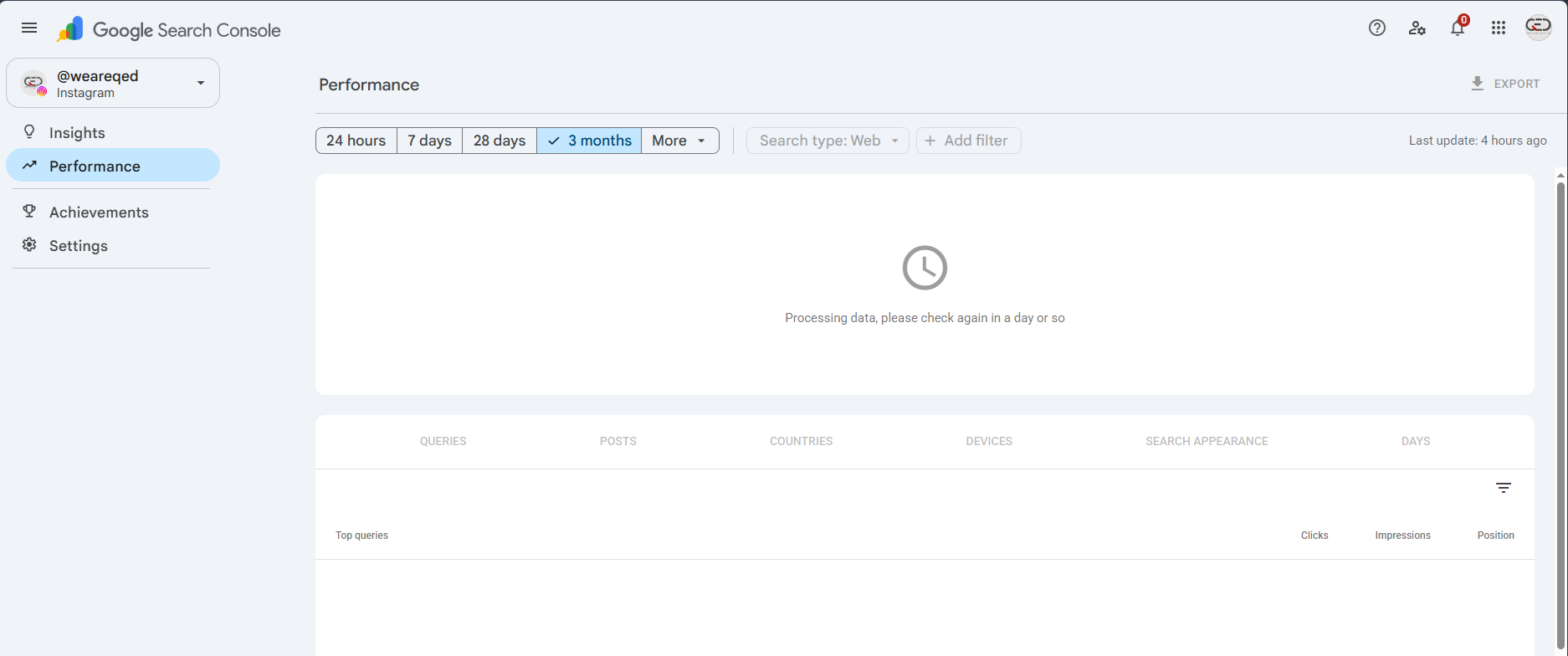
Nothing, which is exactly what Google says will happen. Our @weareqed Instagram property was created successfully and the Performance report returned an empty chart with the message that data is processing and to check again in a day or so.
Three different figures for the same wait are now in circulation, all from Google. The confirmation dialog after adding a property says search performance data can take up to 48 hours to appear in reports. The empty Performance report says to check again in a day or so. The help documentation says it will take a few days for data to appear. Plan for the longest.
Four platforms are supported at launch: Instagram, TikTok, X and YouTube. LinkedIn is not one of them, which for a great many UK B2B businesses is the platform where all of their organic reach actually sits.
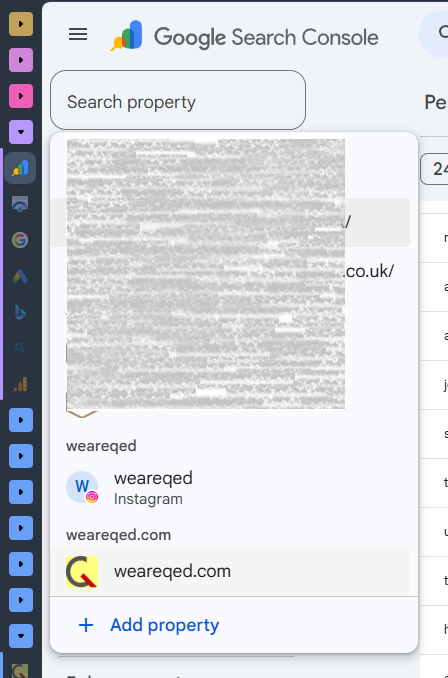
The property selector itself is worth a look once you have added something. Ours now lists a mix of domain properties for client sites alongside a single Instagram property, grouped under the account name rather than a domain. It is a small interface change that signals something larger about how Google is choosing to model an online presence.
One caveat on our own experience. A single account, connected on launch day, with an empty report is not a dataset. It is a setup log. We will publish query data once we have a meaningful sample, and we will say so plainly if the answer turns out to be that there is nothing there.
Who does Google Search Console social media tracking actually help?
Google Search Console social media tracking helps accounts whose content already ranks in Google Search. If your posts do not surface in Google’s results, the reports will be empty, and no amount of connecting accounts will change that.
Work through who that describes. YouTube channels benefit most, because YouTube results appear throughout Google’s SERPs by default. Established publishers with strong brand search benefit, because people search their name and their social posts come back. Creators with high-volume video content benefit, because Discover surfaces short-form video from creators.
Now the group QED writes for. A South Devon plumber with 300 Instagram followers, posting bathroom photos, will see an empty Performance report indefinitely. The mechanism only reports on content that already appears in Google Search. It does not put content into Google Search. Measurement is not distribution, and this is a measurement feature.
That distinction gets blurred in the coverage. Search Engine Journal reported (Search Engine Journal, 2026) that the feature is available even to creators who do not have their own websites, which is true and useful framing for a creator with an audience. For a business with no audience and no website, a platform property reports on nothing, and the correct next step is still to build the asset you control.
Common mistake: Assuming a new Google reporting feature implies a new ranking opportunity. Search Console has never been a ranking lever. It is a mirror. Adding a platform property tells you what Google already thinks of your content. It does not change what Google thinks.
Independent data on how much search traffic social posts actually capture for small accounts does not yet exist for this feature, because the feature is two days old. We searched for it before writing this and found none. Every figure currently in circulation about platform properties comes from Google or from commentary on Google’s announcement. We would rather say that than borrow a number.
Whether an empty report is still worth having is a fair question, and the closing section takes it seriously.
Is it worth connecting your accounts?
Connect them, because the cost is ninety seconds and the query data has genuine value even when the click count does not. Ignore the clicks. Open the Queries tab.
The Queries tab shows the search terms people typed into Google before your post appeared. That is demand data, and it is the same category of information that makes Search Console indispensable for websites. If three separate queries about wood burner installation costs keep surfacing an old Instagram post, you have found a page you should be writing on your own site.
That workflow is not new. We built the recruitment SEO content programme on exactly this principle: find the query where demand already exists, then build the page properly, on a domain you own, with a form on it. A platform property just adds one more place to look for the query.
Pro tip: Set a calendar reminder for two weeks out rather than checking daily. Data takes days to appear, and a fortnight of impressions tells you something a single day never will. If the report is still empty in a month, that is your answer, and it is a useful one.
There is a limitation nobody enjoys stating. For a business whose social accounts have never appeared in Google Search, this feature will confirm that fact in a well-designed dashboard, and confirming it changes nothing. Search Console has always been better at describing reality than improving it. That is not a flaw. Founders who make decisions on data they own tend to make better ones than founders acting on advice, which is a principle we apply to everything we publish.
The website remains the asset. Instagram can change its algorithm, X can change its ownership, TikTok can face a ban, and none of that touches a domain you own with content you control. Platform properties do not change that calculation. They give you one more input into it, for free, in a tool you should already be using.
PPC Land, “Google adds Instagram, TikTok, X and YouTube data to Search Console”, 2026
QED Web Design, first-party setup log, @weareqed Instagram platform property, 7 July 2026
If you want a straight assessment of where your organic visibility actually comes from, across your site and your social accounts, get in touch with QED Web Design, and we will look at the real numbers rather than the launch-week ones..
To provide the best experiences, we use technologies like cookies to store and/or access device information. Consenting to these technologies will allow us to process data such as browsing behavior or unique IDs on this site. Not consenting or withdrawing consent, may adversely affect certain features and functions.
Functional
Always active
The technical storage or access is strictly necessary for the legitimate purpose of enabling the use of a specific service explicitly requested by the subscriber or user, or for the sole purpose of carrying out the transmission of a communication over an electronic communications network.
Preferences
The technical storage or access is necessary for the legitimate purpose of storing preferences that are not requested by the subscriber or user.
Statistics
The technical storage or access that is used exclusively for statistical purposes.The technical storage or access that is used exclusively for anonymous statistical purposes. Without a subpoena, voluntary compliance on the part of your Internet Service Provider, or additional records from a third party, information stored or retrieved for this purpose alone cannot usually be used to identify you.
Marketing
The technical storage or access is required to create user profiles to send advertising, or to track the user on a website or across several websites for similar marketing purposes.