TL;DR: Core Web Vitals are three measurements Google uses to judge how fast, responsive, and stable your website feels to a real visitor: LCP, INP, and CLS.
For a small business, passing them helps your Google ranking and, more importantly, stops visitors from leaving before they buy.
At QED web design we build for these thresholds as standard. As of 2026 the targets are LCP under 2.5 seconds, INP under 200 milliseconds, and CLS under 0.1, each measured on your real visitors, not a lab test.
This guide explains each metric in plain English, what the numbers mean, how to check your own site for free, and which fixes are worth your time.
- Core Web Vitals are three metrics: LCP (loading), INP (responsiveness), and CLS (visual stability), all judged on real visitor data.
- The 2026 pass marks are LCP under 2.5 seconds, INP under 200 milliseconds, and CLS under 0.1, at the 75th percentile of visits.
- Google measures your real visitors, not your fast office broadband, so a site that feels quick to you can still fail.
- According to the HTTP Archive Web Almanack, only around 43% of mobile websites passed all three Core Web Vitals in 2024.
- Passing is a commercial win, not just an SEO one: faster pages keep visitors who would otherwise leave for a competitor.
What are Core Web Vitals?
Core Web Vitals are three specific measurements Google uses to score the real-world experience of a web page: how quickly it loads, how fast it responds to a tap or click, and how stable it stays while loading. They are part of Google’s wider page experience signals, and they are measured on actual visitors rather than in a laboratory. Each metric covers one dimension of experience.- Largest Contentful Paint (LCP) measures loading, the time until the main content of the page appears.
- Interaction to Next Paint (INP) measures responsiveness, how quickly the page reacts when someone interacts with it.
- Cumulative Layout Shift (CLS) measures visual stability, how much the page jumps around as it loads.
 One point that trips people up: INP is relatively new. It officially replaced the older First Input Delay (FID) metric on 12 March 2024, so any guide still talking about FID is out of date. INP is harder to pass because it looks at every interaction in a visit, not just the first one.
Pro tip: You do not need to memorise the acronyms. Think of them as three plain questions: did the page show up quickly, did it respond quickly when I touched it, and did it stay still while it loaded. If the answer to all three is yes, you are passing.
Knowing what the three metrics are is only useful once you know the numbers you are aiming for, which is the next section.
What are the Core Web Vitals thresholds in 2026?
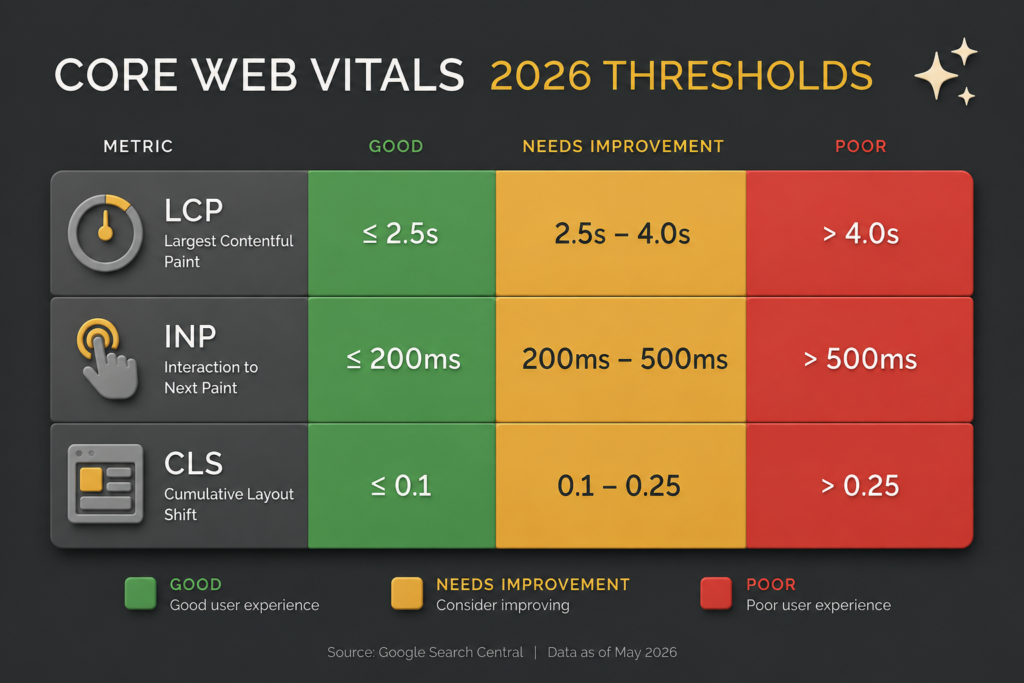
As of 2026, the “good” thresholds are Largest Contentful Paint at or under 2.5 seconds, Interaction to Next Paint at or under 200 milliseconds, and Cumulative Layout Shift at or under 0.1. To pass, your page needs to hit all three at the 75th percentile of real visits, meaning at least three out of four of your visitors get that experience (Google web.dev, 2026). Each metric also has a “needs improvement” middle band and a “poor” band.- For LCP, needs improvement runs from 2.5 to 4 seconds, and poor is over 4 seconds.
- For INP, needs improvement is 200 to 500 milliseconds, and poor is over 500.
- For CLS, needs improvement is 0.1 to 0.25 and poor is above 0.25.
The pass mark is not an average. Google judges you at the 75th percentile, so if a quarter of your visitors get a slow experience, you fail even if the other three quarters are lightning fast. The slowest quarter of your audience matters.
The 75th percentile rule is exactly why a site can look fast to its owner yet still fail, which is worth understanding on its own.
Why does my site pass on my laptop but fail for Google?
Your site can feel instant to you and still fail Core Web Vitals because Google does not measure your experience; it measures your real visitors on their own devices and connections. This is the single most common source of confusion for business owners checking their own sites. Google scores Core Web Vitals using field data from the Chrome User Experience Report (CrUX), which is real, anonymised data from actual Chrome users visiting your site, gathered over a rolling 28-day window. Your visitors are on mid-range phones, on mobile data, in places with weaker signal, with your site already cached on your own machine after dozens of visits. Their experience is slower than yours, and theirs is the one that counts. This is also why a perfect score in a lab tool can be misleading. A tool like Lighthouse runs a single simulated test on one device, which is useful for finding problems but is not what Google grades you on. Field data decides whether you pass; lab data helps you work out why.Common mistake: Testing your site once on your office broadband, seeing it load instantly, and assuming you are fine. Your returning-visitor cache and fast connection paint a rosier picture than most of your audience ever sees. Always check the real-visitor field data, not just how it feels to you.
Since your own impression is unreliable, the practical question is how to check the real numbers, which you can do for free.
How do I check my Core Web Vitals for free?
You can check your Core Web Vitals for free using two Google tools: PageSpeed Insights for a quick per-page check, and the Core Web Vitals report in Google Search Console for a site-wide view over time. Both are free, and neither requires any technical skill to read. PageSpeed Insights is the fastest way in. You enter a page URL and it shows your real-visitor field data at the top, where available, alongside a lab score and a list of specific issues to fix. The field data is the part that matters for passing; the lab suggestions below it are your to-do list. Google Search Console’s Core Web Vitals report then groups all your pages by status, so you can see how many are good, need improvement, or are poor across the whole site.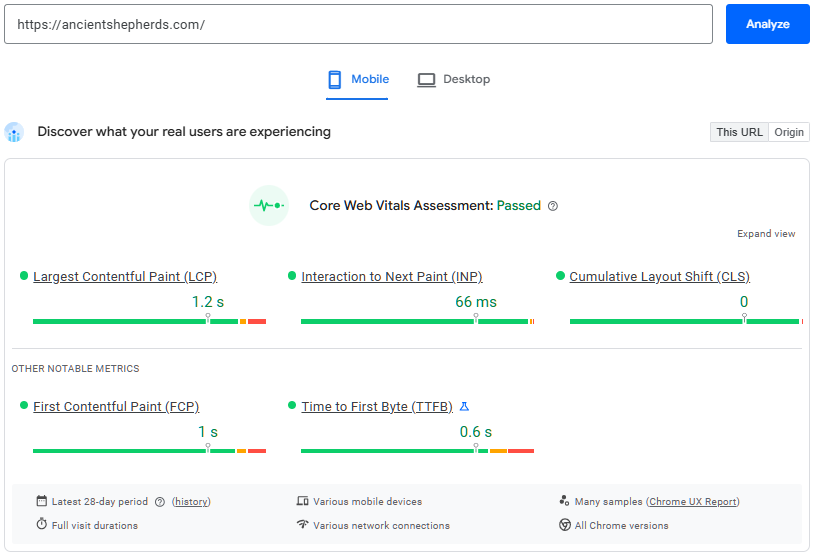
Pro tip: Newer or low-traffic sites often show “not enough data” in the field section of PageSpeed Insights. That is normal and not a failure. It simply means Google has not gathered enough real visits yet, so lean on the lab data and Search Console until the field data fills in.
A brand-new site or a very quiet one may have no field data at all, which is a genuine limitation of the CrUX system rather than a fault with your site. Once you can see your numbers, the useful question is which fixes are worth your time, because they are not all equal.