How to Block AI Crawlers Without Vanishing From Google
WeAreQED
Posted:
Updated: November 14, 2026
TL;DR: You can block AI crawlers without losing your Google rankings, as long as you block the right ones. Training bots such as GPTBot and ClaudeBot can be asked to stay away by name in robots.txt, and Google says doing so has no effect on Search. It is a polite request, not a lock: the operators say they honour it, but nothing forces them to.
Google’s AI Overviews and AI Mode are a separate job. Since 31 August 2026 every site owner has had a Search Console setting that takes a site out of them, a control that exists because the UK’s Competition and Markets Authority ordered Google to provide one.
Below: which bot does which job, the settings and code, the likely consequence of each block, what to do when a bot ignores the rules, and the mistakes that lock Google out by accident.
Key Takeaways
Choosing to block AI training crawlers such as GPTBot, ClaudeBot and Google-Extended in robots.txt does not remove a site from Google. Google’s crawler documentation states that Google-Extended is not used as a ranking signal in Search.
Google’s AI Overviews and AI Mode are controlled by the Search generative AI setting in Search Console, not by robots.txt. Google made it available to all websites worldwide on 31 August 2026.
robots.txt is a request, not a lock. RFC 9309, the standard behind it, states that its rules are not a form of access control.
QED web design blocked AhrefsBot in robots.txt on 1 November 2025, and the bot crawled weareqed.com again the next day, having made 4,676 requests the month before.
Three common mistakes lock Google out by accident: blocking Googlebot, a blanket Disallow: / rule aimed at every bot, and a noindex setting left switched on.
If you want to block AI crawlers, the short answer is that you can, and done properly, it will not cost you your place in Google. I’m Neil, and I run QED web design, a sustainable WordPress and SEO agency in South Devon, with more than 15 years of WordPress work behind it.
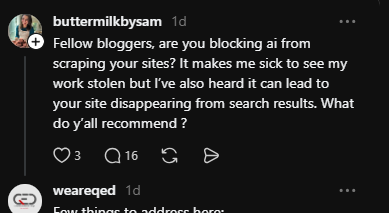
On Threads this week, a food blogger asked her fellow bloggers whether they were blocking AI from scraping their sites. Seeing her work taken made her feel sick, she wrote, but she had also heard that blocking could make a site disappear from search results.
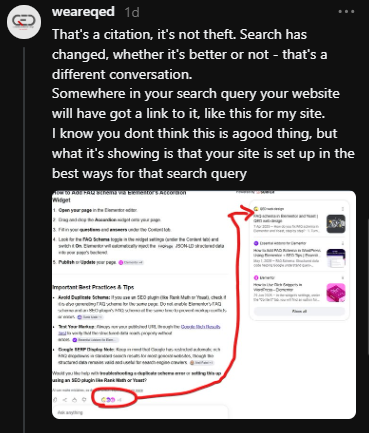
I replied there, and both halves of that worry deserve a fuller answer. In the UK the answer changed on 3 June 2026, when the Competition and Markets Authority ordered Google to give publishers a proper opt-out.
Our older piece on protecting content from AI crawlers and bad bots covers the wider risk picture. Here you get the practical version, correct as of November 2026: what to switch off, where, and what it is likely to cost.
Should you block AI crawlers at all?
It depends on what your website is for. If you sell a service, an AI answer that names and links you can work as free marketing, but if the content itself is what you sell, the trade is far less obvious.
The blogger on Threads had searched Google for one of her own recipes. AI Mode offered step-by-step instructions, then laid out her full ingredients list and method, with a link back to her blog. She called that stealing. I called it a citation.
We were both describing the same screen. It is a citation: her page is named and linked, which also shows it is well built for that search. But a credit is not payment, permission or a visit. A reader with the whole method in front of them has little reason to click, and a recipe blog that earns from ad views is paid in clicks.
Compare it with our side of the fence. In the same thread I posted a screenshot of Google’s AI Mode answering a question about FAQ schema and listing QED Web Design’s guide to FAQ schema in Elementor and Yoast as its first source.
The same guide picked up 3 referral visits from ChatGPT between November 2025 and May 2026 (QED’s own WP Statistics data for that period). Three visits prove nothing about sales, and I am not going to pretend otherwise. A citation is not a visit, a visit is not an enquiry, and an enquiry is not a customer.
So who do AI citations help? Businesses whose customers still need them after reading the answer: the plumber, the restaurant, the accountant. They do far less for a site whose entire product is the answer. Either way, measure referral visits and enquiries before assuming that appearing in an AI answer is doing you any good.
Cloudflare, which sells bot-blocking tools and so has a commercial interest here, compared crawling with referrals across its own network (Cloudflare, 2025). In July 2025, Google crawled 5.4 pages for every visitor it sent back to a site, and Cloudflare notes its Google referral data comes from news-related customers. OpenAI crawled 1,091.4. Anthropic crawled 38,065.7. These are network-wide averages from one month. They show an imbalance between taking and sending back. They do not tell you what your own content is worth, or that blocking is the right call for your business.
The useful news is that the choice to block AI crawlers is no longer all or nothing. Each bot does a different job, and the table further down shows what each block is likely to cost.
Will blocking AI crawlers remove your site from Google?
No. Blocking AI bots by name does not remove a site from Google. The damage comes from three common mistakes made while trying: blocking Googlebot, a blanket rule that shuts out every crawler, and a noindex setting left on.
The rumour has a real origin. People copy a robots.txt snippet from a forum, and the dangerous version is only two lines long: User-agent: * followed by Disallow: /. The asterisk means every well-behaved crawler, Googlebot included. Paste that and Google can no longer read a single page.
WordPress has its own version of the same trap. Under Settings, then Reading, sits a tick box labelled “Discourage search engines from indexing this site”. One click adds a noindex instruction to every page. It is the first thing to check on our list of reasons why a website is not showing up on Google, which also covers the other causes, from server errors to botched migrations.
Naming an AI bot is a different act altogether. Google’s crawler documentation (Google for Developers, 2026) states that Google-Extended, its AI training control, does not affect a site’s inclusion in Search and is not a ranking signal. GPTBot and ClaudeBot belong to other companies and have nothing to do with Google’s index.
Think of robots.txt as the guest list on a pub door. Crossing off one name does not close the pub. Writing “nobody” at the top does.
Which control does which job?
Most indexing accidents happen when people try to block AI bots with the wrong tool. Four controls get confused, and each does something different:
robots.txt controls crawling. It asks a bot not to fetch a page.
noindex controls indexing. It asks a search engine to leave a page out of its results.
A server or firewall rule controls access. It refuses the request outright.
The Search generative AI control covers Google’s AI search features only.
The first two are often mixed up. Google’s robots.txt guide (Google Search Central, 2025) says robots.txt is not a mechanism for keeping a page out of Google: a blocked URL can still show up in results, without a description, if other sites link to it. Combining the two backfires as well, because a crawler cannot read a noindex instruction on a page it has been told not to open.
Which AI crawlers are there, and what does each one do?
AI bots do three different jobs: collecting training data, building a search index for AI answers, and fetching a single page because a user asked about it. Each job has its own bot name, which is why the decision to block AI crawlers is really three separate decisions.
A crawler is a program that fetches web pages automatically, and it announces itself with a name called a user agent. That name is what you target when you block AI crawlers. The table covers four of the biggest operators as things stand in November 2026. It is selective, not exhaustive: Microsoft, Meta, Apple, Common Crawl and many smaller operators run bots of their own.
Bot or control
What it does
How you ask or block
Potential consequence of blocking
Googlebot
Builds Google's search index, which also feeds AI Overviews and AI Mode
robots.txt, but do not
Google can no longer read your site
Search generative AI control
Decides whether your site appears in AI Overviews, AI Mode and Discover's AI features
Search Console, under Settings
No links or impressions from Google's AI answers
Google-Extended
A robots.txt token, not a crawler. Covers Gemini training, plus grounding in the Gemini apps and on Vertex AI
robots.txt
None in Google Search, by Google's account. Gemini stops using your pages as a live source
GPTBot
Collects content that may train OpenAI's models
robots.txt
None in search
OAI-SearchBot
Finds pages to show in ChatGPT's search answers
robots.txt
Fewer ChatGPT search citations
ChatGPT-User
Fetches one page when a ChatGPT user asks about it. Not automated crawling
Server or firewall rule. OpenAI says robots.txt may not apply
A person asking ChatGPT about your page may get nothing back
ClaudeBot
Collects content that may train Anthropic's models
robots.txt
None in search
Claude-SearchBot
Indexes pages for Claude's search results
robots.txt
Less visibility in Claude search
Claude-User
Fetches one page when a Claude user asks about it
robots.txt
Claude cannot open your page when a person asks it to
PerplexityBot
Finds and links pages in Perplexity's results. Perplexity says it is not used for training
robots.txt
Fewer Perplexity citations
Perplexity-User
Fetches one page when a Perplexity user asks about it
Server or firewall rule. Perplexity says it generally ignores robots.txt
A person asking Perplexity about your page may get nothing back
QED Web Design, weareqed.com · Operators' own documentation, checked November 2026. Selective, not exhaustive
Two details matter here. OpenAI’s documentation (OpenAI, 2026) says a site that blocks OAI-SearchBot will not be shown in ChatGPT search answers, although it can still appear as a plain navigational link. Anthropic’s help page (Anthropic, 2026) says all three of its bots honour robots.txt.
Bear in mind whose word that is. Every description in the table comes from the company that runs the bot, and nobody outside those companies can audit what happens to a page once it has been fetched. The next two sections cover the settings themselves, starting with Google.
How do you keep your content out of Google’s AI Overviews and AI Mode?
Use the Search generative AI control in Google Search Console. It sits under Settings, applies to a whole property, and takes a site out of AI Overviews, AI Mode and the generative AI features in Discover. It is not a general opt-out from Google’s AI.
Time needed: about five minutes
Open Search Console and choose your property.
Go to Settings, then Search generative AI.
Select “Exclude my site’s links and content from Search generative AI features”.
Wait. Google’s help page says exclusion generally takes a few days, and cached content can take longer.
The control exists because a UK regulator insisted on it. Sarah Cardell, Chief Executive of the Competition and Markets Authority, described it in the CMA’s press release of 3 June 2026 as a world-first requirement on Google’s search services. Google has nine months from that date to implement the full set of changes, and it opened the setting to all websites worldwide on 31 August 2026.
What does the setting cover, and what does it leave alone?
It covers three Google features and nothing else. According to Google’s help page (Google Search Console Help, 2026), excluding a site means:
It does stop your links and content appearing in AI Overviews, AI Mode and Discover’s AI features, and stops your pages being used as an input for those answers.
It does not change your ordinary listings. Google says the control is not a ranking or inclusion signal for the rest of Search.
It does not stop AI training, or use of your pages in the Gemini apps. Those belong to Google-Extended.
It does not stop Google using your content to run Search as a whole, such as helping its systems understand language.
It does not override choices made in Merchant Center or Google Ads.
What does it cost? Mrinalini Loew, General Manager of Google Search Ecosystem, writing on Google’s blog on 3 June 2026, said sites that opt out receive no traffic or impressions from those AI features, and that the control is not used as a ranking signal elsewhere in Search. Treat the second half as Google’s claim about its own product. The setting has been global for under three months, and I have not found independent testing of that ranking promise.
There is a catch that matters to anyone in the food blogger’s position. Google’s help page says content from other sites will still appear in those features and may look similar to yours. Opting out removes your link. It does not remove the answer.
Does Google-Extended stop AI Overviews?
No, and it is the most repeated mistake on this subject. The common claim is that adding Google-Extended to robots.txt keeps a site out of AI Overviews. Google’s crawler documentation says otherwise: Google-Extended covers the training of future Gemini models and grounding, meaning the supply of live web content to a model at the moment it answers, in the Gemini apps and on Vertex AI.
Two switches, two jobs. Search Console handles AI answers inside Google Search. Google-Extended handles Gemini. A site that wants out of both needs both.
Can you opt out for some pages only?
Partly. Google lists the control as site-wide, but its help page explains that a child property can carry its own setting. Add a URL-prefix property for a folder such as /recipes/ and you can exclude that section while the rest of the site stays in. True page-level controls are due later: trade publication PPC Land reports a CMA deadline of 3 March 2027 for them.
How do you block AI training crawlers with robots.txt?
Add a named group for the training bots to your robots.txt file, the plain text file at the root of a website that tells crawlers where they may go. Name each bot individually and never use the wildcard.
# Ask AI training crawlers to stay out. Search engines are not affected.
User-agent: GPTBot
User-agent: ClaudeBot
User-agent: Google-Extended
Disallow: /
Those three are the training controls documented by OpenAI, Anthropic and Google. To block AI crawlers from other operators, add the names that appear in your server logs after checking each operator’s own documentation.
On WordPress there is usually no physical file to open, because WordPress generates robots.txt on the fly. You edit it through your SEO plugin. QED Web Design runs All in One SEO, where the route is the All in One SEO menu, then Tools, then Robots.txt Editor, with “Enable Custom Robots.txt” switched on. Yoast SEO and Rank Math have file editors of their own.
All in One SEO also has a “Block AI Crawlers” section in that editor, with a tick box for each bot it knows and one for all of them (All in One SEO, 2026). Tick individual training bots and read the preview before saving. The all-in-one box may also cover AI search bots you wanted to keep.
Then visit yourdomain.co.uk/robots.txt in a browser, confirm the new lines are there, and give it a day. OpenAI and Perplexity both say a robots.txt change can take around 24 hours to register. Anthropic adds that every subdomain needs its own file, so a shop on shop.yourdomain.co.uk is not covered by the main site’s rules.
Common mistake: pasting User-agent: * with Disallow: / to “block AI”. That rule shuts out Google and Bing as well. If you take one thing from this page, name the bots.
Pro tip: to stay visible in AI answers while keeping your work out of training sets, name the training bots only. Leave OAI-SearchBot, Claude-SearchBot and PerplexityBot alone.
Bot names change, so a list copied from a 2023 blog post will have gaps.
Help is coming on that front. John Mueller, Google Search Advocate, writing on the Google Search Central Blog on 30 October 2026, announced plans to support a single shared robots.txt token so that one rule can state a training preference to several AI providers at once. Google’s crawler documentation names it __usage_ai-training and gives early 2027 as the target, and Anthropic’s help page says it has honoured the signal since 30 October 2026, with the rollout still under way. It is a draft standard and may change, so keep the named bots in place.
Then you refuse it at the server or the firewall, because robots.txt is a polite request and nothing more. The standard that defines it, RFC 9309 (IETF, 2022), is explicit that its rules are not a form of access control.
We learned that first-hand. QED web design blocked AhrefsBot, an SEO tool’s crawler, in robots.txt on 1 November 2025. It crawled weareqed.com again on 2 November. Our server logs for October 2025 showed 4,676 requests from that one bot, and the full story is in our post on SEO crawlers harming website performance.
Some AI fetchers are open about it. OpenAI’s documentation says robots.txt rules “may not apply” to ChatGPT-User, because a person triggered the visit. Perplexity’s documentation says Perplexity-User “generally ignores robots.txt rules” for the same reason.
Others have been accused of worse. Cloudflare reported on 4 August 2025 that Perplexity switched to an undeclared crawler posing as an ordinary Chrome browser when its named bots were blocked. Perplexity denied it, as reported by ITPro. Cloudflare sells the cure, so weigh that, but it published its method.
In the same 2025 tests, Cloudflare found ChatGPT-User stopped when told to. That was before OpenAI’s documentation took its current “may not apply” position, so treat the older test as history, not a promise.
How do you block AI crawlers at the server?
On Apache or LiteSpeed hosting, the usual setup for a cPanel WordPress site, a short rule in the .htaccess file refuses any request that announces itself with a listed name. The example below covers two training bots and the two user-triggered fetchers from the table. It is a block on selected names, not an AI firewall.
# Refuse selected, self-declared AI user agents. Edit the list to suit.
# robots.txt stays readable so polite bots can still see your rules.
RewriteEngine On
RewriteCond %{REQUEST_URI} !^/robots\.txt$
RewriteCond %{HTTP_USER_AGENT} (GPTBot|ClaudeBot|ChatGPT-User|Perplexity-User) [NC]
RewriteRule .* - [F,L]
Back up the file first, because a typo in .htaccess can take a site offline. Leave OAI-SearchBot, Claude-SearchBot and PerplexityBot off the list unless you also want out of those AI search results.
What are the limits of a server block?
A user agent block only stops bots that tell the truth about who they are. The name is self-declared, so anything can claim to be GPTBot, and a scraper posing as an ordinary browser sails straight past. Three limits follow from that:
Verification takes more than a name. OpenAI and Perplexity publish the IP addresses their bots use, and a firewall can check a request against them. Anthropic publishes a list too, but warns that blocking by IP address may not work reliably.
A bot service does it better than a small site can. If your site sits behind Cloudflare, its managed rule for blocking AI crawlers works on behaviour as well as names, and Cloudflare says it is available on free plans.
Nothing reaches backwards. A block stops future visits. It cannot retrieve or erase what was collected before you added it.
Think of robots.txt as the “no junk mail” sticker and the server block as the locked porch. Neither stops someone determined to read your post through the window. Anyone promising total protection is selling something.
What should a small business website actually do?
Match the block to the business model. For most service businesses, the sensible starting point is to block AI training crawlers at most and leave the rest alone, while content-led sites have a harder decision to make.
If you sell a service
Trades, restaurants, consultants and shops want to be found, named and linked. Leave Googlebot and the AI search bots alone. Ask the training bots to stay out if the principle matters to you, knowing Google says it costs nothing in Search. Then watch what AI referrals actually do: visits, time on page and enquiries, not mentions.
If your content is the product
Recipe sites, paid guides and original research are a different case. Name the training bots. Then open the Generative AI performance report in Search Console, which shows how often your pages appear in Google’s AI features, before deciding whether to exclude the site. Test on one section first using a URL-prefix property, and remember the catch: someone else’s version of the answer will fill the gap.
Whatever you choose
Never block Googlebot or Bingbot.
Never use the wildcard with Disallow: / on a live site.
Confirm “Discourage search engines” is unticked in WordPress.
Check your live robots.txt after any plugin change or migration.
Review the bot names twice a year against each operator’s documentation.
Blocking AI crawlers comes down to three decisions, in this order:
Decide whether AI training on your content is acceptable to you.
Decide whether AI search referrals are worth having, using your own numbers.
Apply the matching controls without touching ordinary search indexing.
If you would like a second pair of eyes on your robots.txt or your Search Console settings before you change anything, get in touch with QED
To provide the best experiences, we use technologies like cookies to store and/or access device information. Consenting to these technologies will allow us to process data such as browsing behavior or unique IDs on this site. Not consenting or withdrawing consent, may adversely affect certain features and functions.
Functional
Always active
The technical storage or access is strictly necessary for the legitimate purpose of enabling the use of a specific service explicitly requested by the subscriber or user, or for the sole purpose of carrying out the transmission of a communication over an electronic communications network.
Preferences
The technical storage or access is necessary for the legitimate purpose of storing preferences that are not requested by the subscriber or user.
Statistics
The technical storage or access that is used exclusively for statistical purposes.The technical storage or access that is used exclusively for anonymous statistical purposes. Without a subpoena, voluntary compliance on the part of your Internet Service Provider, or additional records from a third party, information stored or retrieved for this purpose alone cannot usually be used to identify you.
Marketing
The technical storage or access is required to create user profiles to send advertising, or to track the user on a website or across several websites for similar marketing purposes.