TL;DR: “Why is my WordPress site slow?” – it’s a commonly asked question when non website designer/devs get involved in a website.
A WordPress site is almost always caused by a handful of usual suspects: too many plugins, oversized images, no caching, cheap hosting, or a heavy theme and page builder.
The good news is that most of it is fixable, and some fixes take minutes. This guide explains what actually slows a WordPress site down, how to measure it properly, what you can sort yourself, and when it is worth handing over to someone.
Speed is not just about patience either. A faster site ranks better, converts better, and uses less energy per visit, which is why we treat performance and sustainability as the same job.
- A slow WordPress site is usually down to plugins, images, caching, hosting, or a heavy theme, not one mysterious fault.
- Measure before you change anything, using a real tool like Google PageSpeed Insights rather than how the site feels to you.
- Some fixes are quick wins you can do today, like compressing images and removing plugins you no longer use.
- By changing just one thing on a client site, we increased performance by 57.7% and cut its carbon footprint by 95%.
- Speed feeds directly into SEO and conversions, so a faster WordPress site is a commercial win, not just a nicety.
If you have ever sat watching your own website crawl into view and wondered why is my WordPress site slow, you are asking the right question, and you are far from alone. WordPress powers a huge share of the web, and a slow WordPress site is one of the most common complaints small business owners bring to us. The reassuring part is that slowness is a symptom with a short list of usual causes, not a random curse. Once you know where to look, most of it is fixable, and some of it is fixable today.
How do you actually measure WordPress speed?
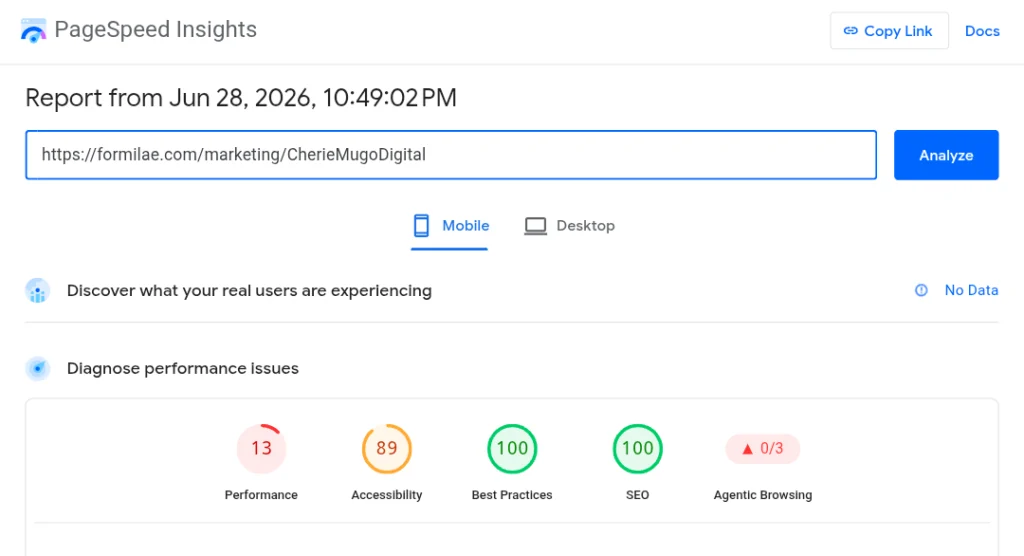
You measure WordPress speed with a proper testing tool rather than by how the site feels, because your own connection and browser cache give you a misleadingly rosy picture. The site that loads instantly for you can be painfully slow for a first-time visitor on mobile data.
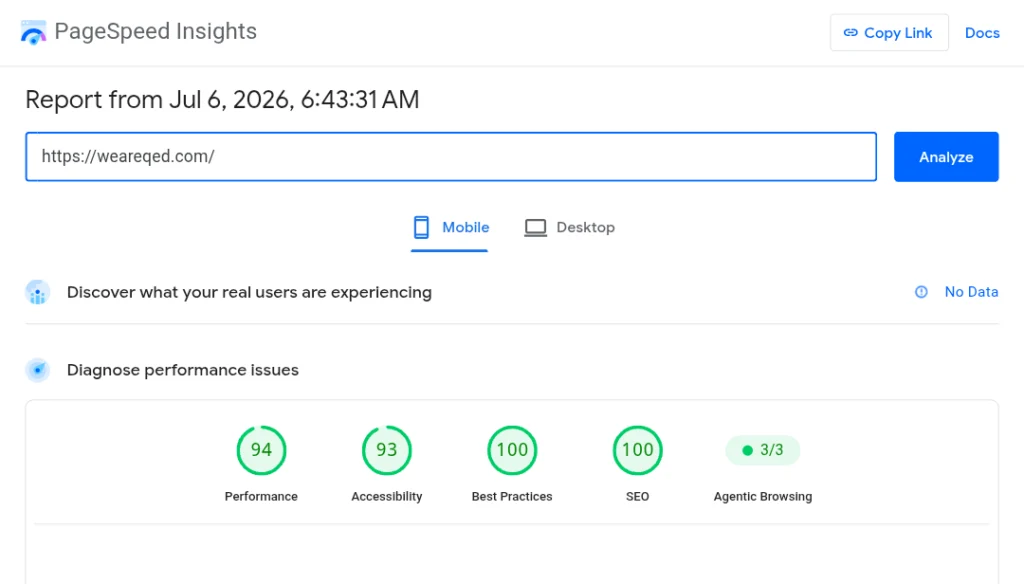
The most useful free tool is Google PageSpeed Insights, which scores your page and, more importantly, tells you what is dragging it down. Google’s Core Web Vitals are the specific measurements it cares about: how fast the main content loads, how quickly the page responds to a tap, and how much things jump around while loading. Those three are the ones that feed into search ranking.
Once you have a baseline score, you have something to improve against. That is when it helps to know what actually causes the slowness.
What actually makes a WordPress site slow?
A WordPress site is slow for a small number of recurring reasons, and most struggling sites are guilty of several at once. Here are the usual suspects, roughly in the order we tend to find them.
Too many plugins, or badly built ones. Every plugin adds code that has to load. It is not simply the number, a single poorly built plugin can do more damage than ten lean ones, but a long plugin list is often a red flag. Plugins you installed once and forgot about are pure dead weight.
Oversized images. This is the single most common culprit we see. A photo straight off a phone or camera can be several megabytes, and dropping a few of those onto a page forces every visitor to download all of it. Properly sized and compressed, the same images can be a fraction of the weight with no visible loss of quality.
No caching. Without caching, WordPress rebuilds each page from scratch on every single visit. A caching setup saves a ready-made version and serves that instead, which is dramatically faster.
Cheap or overloaded hosting. Bargain shared hosting often crams huge numbers of sites onto one server. When your neighbours get busy, your site slows down, and there is nothing you can change on your end to fix it.
A heavy theme or page builder. Some themes load enormous amounts of code for features you never use. Page builders can do the same if the site is not built carefully, which matters because we build with Elementor and know exactly where that bloat creeps in.
With the causes clear, the practical question is what you can do about them yourself.
How do you speed up a slow WordPress site yourself?
You can speed up a slow WordPress site yourself by tackling the easy wins first, in order of effort versus payoff. You do not need to be technical for the first few.
Start by compressing and resizing your images, since this usually gives the biggest single improvement for the least skill. Next, go through your plugins and deactivate then delete anything you are not actively using. After that, install a reputable caching plugin, of which there are several well-regarded free ones, and work through its basic setup.
Beyond that, things get more technical quite quickly. Optimising which scripts load and when, cleaning up the database, setting up a content delivery network, and choosing a genuinely fast host are all worthwhile, but they carry more risk of breaking something if you are guessing. There is no shame in stopping at the easy wins and getting help for the rest.
Before we get to that, it is worth understanding why all this effort pays off twice over.
Why does a faster site also mean a greener one?
A faster site is almost always a greener site, because the same things that slow a page down, heavy images, bloated code, and needless requests, also burn more energy every time someone loads it. Speed and sustainability are two views of the same underlying quality: a lean, efficient site.
The common assumption is that going green means stripping features out and ending up with something worse. Our experience says the opposite. We took on a client site and, by changing just one thing, increased its performance by 57.7% while cutting its carbon footprint by 95%. Faster and lighter, with nothing lost. You can read more about this thinking in our explainer on what sustainable web design actually means.
There is also a direct commercial reason to care, which is the link between speed and being found. We cover that fully in our guide to how web design affects your SEO. The short version is that Google rewards fast sites, so speed is not vanity, it is visibility. That is also where the case for professional help gets strongest.
When is a slow WordPress site a job for a professional?
A slow WordPress site becomes a job for a professional when the easy wins have not been enough, when the technical fixes make you nervous, or simply when your time is better spent running your business than wrestling with caching settings. There is no prize for doing it the hard way.
Some jobs genuinely benefit from experience. Diagnosing exactly which plugin or script is the bottleneck, safely optimising how code loads, migrating to better hosting without downtime, and doing all of it without breaking the site are the kinds of things that are quick for someone who does them regularly and stressful for someone who does not.
This is also where ongoing care matters. A site that is fast today can slow down again as plugins update, content grows, and new features get added. Keeping it fast is a maintenance habit, not a one-off event, which is exactly what a WordPress care plan is for. You can also see the results of this approach across our portfolio of fast, sustainable sites.
The honest bottom line is that a slow WordPress site is a solvable problem, whether you fix it yourself or hand it over. If you would rather someone just sorted it, get in touch and we will take a look and tell you straight what is slowing you down.
Sources
- QED Web Design – Morgan-Huntley.com, homepage (first-party client performance figures: 57.7% performance increase, 95% carbon reduction), 2026, weareqed.com
- Google, “About PageSpeed Insights“, Google for Developers (measurement tool referenced), 2025
- Google, “Understanding Core Web Vitals and Google Search results“, Google Search Central (ranking signals: LCP, INP, CLS), 2025
- Website Carbon Calculator, “How does it work?” (free carbon-checking tool referenced), Wholegrain Digital, 2026